Wednesday, September 29, 2010

ROBOT Indian Movie


I don’t generally blog about movies as i am very picky in watching movies. I used to watch many movies during the early days but have become very choosy for the 10 plus years or so..

Having said that, i should say this is one of the most awaited Indian movie that many people are looking forward for a long time.. The movie took about 2 years for production and some of the great people joined hands in this movie and releasing in Hindi, Telugu and Tamil languages in tandem. Looks like HBO is releasing with English sub titles in the west.
Firstly 2 Oscar award winners A.R.Rahman and Resul Kutty and then Superstar Rajnikanth arguably the second highest paid actor in Asia after Jackie Chan opposite with Aishwarya Rai Miss World in 1994 directed by one of the box office hit director S.Shankar produced by SUN pictures with a whopping budget of around Indian Rupees 160 plus crores which is around USD 35 million and in comparison to movie like Avatar which is around USD 235 million is no way near but for an Indian movie this is one of the most expensive movies done in recent times. If one has to believe what the production house and other media is saying this is the highest budget  movie ever made in India film industry.
Atleast 40 percent of the budget is on the special effects and animation and is done by Stan Winston studios the team that has worked in Avatar movie. The movie action sequences are done by Yuen Woo-ping who did for movies like Matrix and other Jacki Chan and Jet Li movies plus lots of other talented technical crew including Randy the movie cinematographer and it seems that without him the movie would have taken a longer time to complete.
I wish the team Good Luck..
Here is the trailer which is set to release on 1st October 2010.

At the time of writing this i noticed in Singapore the movie is releasing tomorrow and is fully booked and in India all theatres are full for 1 week.

Saturday, August 14, 2010

Nokia never sleeps

I have been using Nokia E71 for quite some time now and i like using it most of the time. Although I have plans to buy iPhone, BB, and Nexus One in the coming years :) This particular feature “Alarm even when the phone is OFF” is a very neat feature which comes very handy when your battery is low in E71.

I realised my phone battery is low when i go to bed but i need to set an alarm for the morning. If i keep the phone running for whole night it will die in the middle and hence i just set the alarm and switched off the phone.
So when the time came in the morning, NOKIA wakes you up and gently asks whether i want to “SWITCH ON” the phone.  Nice little feature but realised that this is not available in many phones including iPhone 4G and in some cases even the BB and Android devices.

Thanks Symbian and Nokia..

Saturday, June 26, 2010

Need advice from Gadget gurus

I am planning to buy a new notebook for my home office use. Though I don't run a business from home it simply means that i will have the following application server, web server and a database server installed for my learning. Mostly the list will include
  1. IBM Lotus Domino server V8.5.x
  2. IBM Lotus Quickr server V8.5.x
  3. IBM Lotus Symphony
  4. IBM WebSphere Portal V6.1.x with WCM
  5. DB2 / My SQL / MS-SQL
  6. IIS, IBM Http server / Tomcat / JBoss
  7. Lotus Notes, Lotus Domino Designer and Administrator V8.5.x
  8. Eclipse / RAD tools
  9. MS Visual Studio
  10. MS - Office full suite including Visio, Project etc
  11. FeedDemon reader
  12. Windows live writer
  13. Nokia PC suite
  14. IE, Firefox and Chrome
  15. IM tools, Skype
  16. Photo editing tools
  17. Plus the Windows 7 system programs and Laptop manufacturer specific programs
  18. And sometimes go crazy download and install web frameworks and once in a while gaming, watching movies etc
I am pondering over Lenovo Thinkpad 410 vs Thinkpad 410i vs Samsung R480
  • Lenovo Thinkpad 410 Configuration priced around SGD 2250
Processors Intel® CoreTM i5-520M processor
  (2.40GHz up to 2.93GHz with Turbo Boost, 3MB L3 Cache)
Operating system12        Genuine Windows®7 Professional
Chipset  Mobile Intel® QM57 Chipset
Memory8  2GB DDR3 SDRAM
Hard disk4  320GB SATA HDD (7200 rpm)
Optical device5 Dual Layer Multiburner Drive (DVD-RW)
Graphics Intel® Graphics Media Accelerator HD Graphics
Display  14.1" WXGA+ TFT with X201 LED Backlight Display
Battery  6-cell Li-ion Battery
Warranty   3-year on-site Warranty
  •  Lenovo Thinkpad 410i Configuration priced around SGD 2050
Processors Intel® CoreTM i5-430M processor
  (2.26GHz up to 2.53GHz with Turbo Boost, 3MB L3 Cache)

Operating system12        Genuine Windows®7 Professional
Chipset  Mobile Intel® QM57 Chipset
Memory8  2GB DDR3 SDRAM
Hard disk4  320GB SATA HDD (7200 rpm)
Optical device5 Dual Layer Multiburner Drive (DVD-RW)
Graphics Intel® Graphics Media Accelerator HD Graphics
Display  14.1" WXGA+ TFT with X201 LED Backlight Display
Battery  6-cell Li-ion Battery
Warranty   3-year on-site Warranty
  •  Samsung R480 Configuration priced around SGD 1500
Processors Intel Сore i5 540M, 2.53 GHz

Operating system12        Genuine Windows 7 Home Premium (32 bit).
Chipset  Intel HM55 Express
Memory8  4GB (DDR3/2GB x 2)
Hard disk4  500GB (5,400rpm S-ATA)
Optical device5 Super Multi Dual Layer (S-ATA)
Graphics nVIDIA GeForce 310M 512MB gDDR3
Display  35.56cm (14.0 inch) LED HD (1366 x 768) 16:9 Gloss
Battery  6-cell Li-ion Battery
Warranty 2 year local warranty
For the requirements stated above, which once would be a better choice? While i am tempted to buy Samsung purely because of pricing, i am not sure whether it can meet my requirements given above.  Thanks in advance. Happy weekend ;)

Tuesday, June 22, 2010

My Journey with XPages

Well, this Xpages thing is running in mind for quite some time. I had attended a training conducted by Stephan Wissel a.k.a Singapore Lotus Guru some time ago. During one of my chat sessions with him  i was discussing with him about a simple task management sytem and told him i make use of some of the free wiki based tools for the same.
He told me that why don’t I write a Xpages application for the same for which I responded that after the training I will give it a try. He was kind enough to tell me that he could host the app for me in his server.
Work kept me busy and didn’t find much time to read and learn Xpages stuff. Yesterday, i was in a mood to learn and write some code and play with it. So I started learning Xpages. My usual way of study is I read a lot of theory first before start doing anything with it. Somehow I fel t that I should not follow the same for Xpages and started doing it and within a day I manage to put a simple application.
I learned Xpages and applied it for a simple task management system. This may not be a full fledged application but contain all the ingredients to make use of it rightaway.
My objective is very simple. I need to store personal tasks that needs to be done and the priority. Also a brief description of what needs to be done. I should be able to update it any time if I need to change (for eg. Changing the priority etc).And I can also delete the tasks if I don’t want it. Since the need is not complex, i want all this to be done in a single screen in Web2.0 fashion
Here we go, in traditional LND development, you will have a form to create the task list with the fields inside. If you build it will look like this,
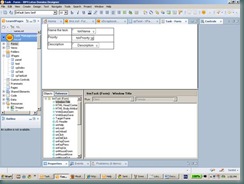
clip_image002
You can start creating task documents using the above Task form. Then you need a view to show the task documents. Then build a view to show the list of tasks. It will look like this,
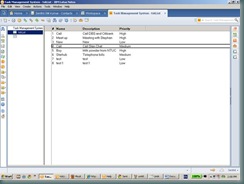
clip_image004
For a simple application, that’s all we need. With this one can perform all the CRUD operations using LN client. Now Domino does quite well in translating this and you could make use of this from the browser too. Wanna see that,
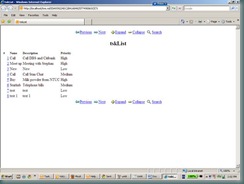
clip_image006
Upon clicking the link, it will take you the document itself
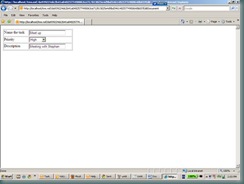
clip_image008
You can actually edit the document and update from here. Not so pretty but you can make it pretty by making use of custom HTML, CSS and a bit of Javascript. That will take some time though.
With the advent of Xpages, this is kind of breeze. How do we do that? I will show the output first before I go in to the details. This is how it looks at the end of it,
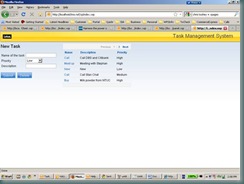
clip_image010
Much neater, isn’t it. The magic behind this is Xpages in Domino which is available from LND 8.5 Remember the first form we built in the beginning, now you need to build a corresponding Xpage and assign a data source for the same in this case it’s a Domino document. Once you are done with it you will have to do a simple data binding. Data binding is an important thing where for every element in the Xpage you match that with the corresponding field element in the Notes form. Let’ see how,
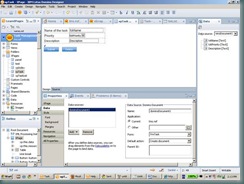
clip_image012
There are plenty of controls that is available with Domino 8.5.1 and using which you can built a nice looking pages as shown above.
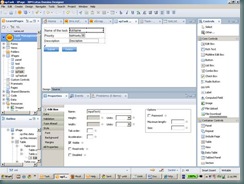
clip_image014
Drag and drop the controls based on your needs, and finally place buttons for submit and delete. Since we have already defined the data source as Dominodocument before, clicking the submit button will create documents in the database.
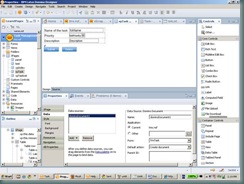
clip_image016
Ok next thing is the equivalent of Notes View in Xpages. For which build a Xpage and define the data source as Domino view this time and choose the view you want to use. You can drag and drop the view columns from the data palette that is shown there, the output will be like this.
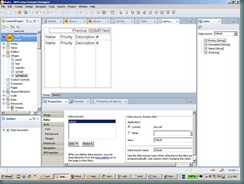
clip_image018
Notice the page navigation a.k.a pager has been added automatically. Now comes the best part, using Xpages you can tie this both in a single screen by making use of the container controls panel, table, include page and view. I have imported the style sheet that is provided in the training class Styles.css which and the image resources.
So I build a new Xpage called xpIndex which will include the above,
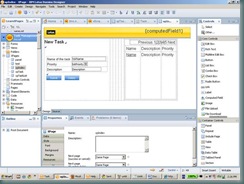
clip_image020
After that it’s all about just configuring the delete button so that all the things will happen in a single screen itself when you hit the URL http://localhost/tms.nsf/xpIndex.xsp
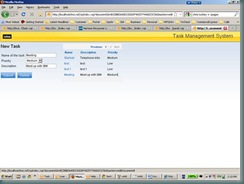
clip_image022
Upon clicking the task, it will be populated in my new task page and I can modify and submit. The changes will go in to the database automatically. Similarly, I can delete the document, for eg
Selecting a task New will be added in the new task page and upon clicking ‘Delete’ the system will prompt for the confirmation
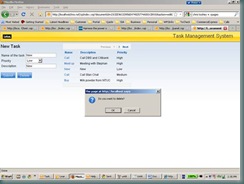
clip_image024
and if you say Ok the task will be deleted,
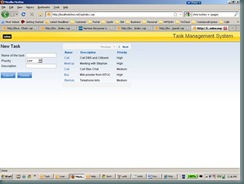
clip_image026
That’s it. One more thing, until now you view this in browser and you just don’t have to do any more thing to use it in Notes client. Wanna see the Notes client view,
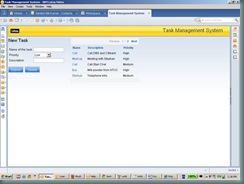
clip_image028
There lies the Xpages beauty…
Considering the fact, I have not done much coding lately, most of my work is related with Project Management, customer handling, team management and selling technical solutions to customers this is quite reasonable. Learn Xpages in a day’s time and building a simple app.
I will learn more from here and might just give it a try to build the same using .NET

Lotus Notes Domino App Development Wiki

I wonder, why am i not able to the screenshot images in the above mentioned wiki. As far as i remember, i don't encounter this problem in any other web sites. Do you see this as well?
In chrome, i get this
DominoWiki
In Firefox it's even worse i won't even know that there is a image in between the text
LotusWiki
In IE 7.x it look like this,
DominoWiki1
What could be wrong here?